
On 1/31/2012, Microsoft published a document regarding support for Large Meetings in Lync 2010.
Background
This particular topic is near and dear to my heart. While working as a sales person for Lync, I had the privilege of selling OCS, OCS R2 and Live Meeting. Say what you will the Live Meeting experience, one thing Live Meeting did well was meeting sizes up to 1250 attendees. Meetings that required more than 1250 attendees is what is referred to as an “event”. Microsoft at one point provided a service that allowed for events of up to 2500 users, but that was discontinued. Meetings that required more than 1250 attendees was then referred to folks like On24, Worktank and Eventbuilder. Live Meeting is not a long term service for Microsoft. While it was a core service for BPOS, it is not included in Office 365. With Office 365, web conferencing is transitioned to Lync Online and Microsoft began the tough job of working to transition the customers of Live Meeting to Lync Online or Lync Server 2010. Microsoft ultimately published some good materials on transitioning users from Live Meeting to Lync. This set of materias includes planning workbooks, some job aids and other materials aimed and assisting the transition from Live Meeting to Lync. The one elephant in the room, however, over the last 12+ months, has been the fact that both Lync and Lync online had a published limit of 250 attendees in a meeting and while I would agree that the LARGE majority of meetings are less than 250 attendees, and to that even less than 20 attendees, meetings of 1000 users are important. Customers want large meetings and don’t want to necessarily have to go to a web streaming content provider to deliver them.
Changes to Lync Meeting Support
In November of 2011 a brief blog entry announced that Lync Online would now support up to 1000 participants in a meeting. The blog entry indicated that changes to the Lync Online documentation would be coming. I haven’t seen any changes to the documentation as of yet and the Service Description for Lync Online dated 1/13/2012 still refers to the limit as 250. That said, the hope that the limit had changed was enough that the blog entry was picked up in different media outlets, I found it on Twitter and the word was spread with the hope that somehow the same limits would ultimately apply to Lync 2010.
That brings us to tonight and the new document was posted supporting large meetings.
What does it mean to be “Supported” anyway?
When you read something is “supported” or “not supported” it generally can mean one of only a couple of things. First, it could mean that the product team has gone through testing and found that a particular scenario fails testing. However, when that happens, there is generally documentation to support it in a knowledge base (KB) article or whitepaper. The more likely scenario is that the product team was simply unable to test the scenario and so while it may be possible; it hasn’t been tested and therefore cannot be supported by Microsoft. You have to realize, the testing matrix for a product can include a tremendous number of interoperability and functionality tests. So while the product team would like to test every scenario and the test team does try to, there are simply things that have to fall out so a product can ship on time. Thus, the dreaded “not supported” tag is occasionally utilized. So again, it is possible that a scenario will function, if the product team hasn’t tested it, it will likely be unsupported. With Lync, meetings of larger scale than 250 users hadn’t really been tested and so could not be supported. ****In this case, it should be noted, Virtualization Support for this subsequent topology is NOT supported.
Lync Scalability Testing
Hao Yan (author of the document), walks you through the scalability testing of the Lync product and provides the details around the documented 250 attendee limitation in Lync. That limit is based on a model where servers are leveraging all of the possible modalities included in a meeting including audio, video, application sharing, powerpoint presenting, polls, Instant Messaging and more. The test team has to also utilize hardware based on the specs outlined in the Lync documentation and then they run through some calculations to try to determine how they will leverage the Lync stress tool to test the environment. Because of the distribution of the conference load, the sharing of hardware resources and the reservation-less model used by Lync, it is simply more difficult to support larger meetings without a very structured approach to setting up large meeting support.
Supporting Large Metings
So what changed? Well, to summarize 10+ pages, you need to dedicate a Front End Pool just for large meetings. The idea is to create an environment where the server that will host the meeting will not have to share its resources with ANYONE or ANYTHING else and VIRTUALIZATION IS NOT SUPPORTED. There are strict topology guidelines for supporting large meeting and they provide a sample topology in the documentation.
Topology for a dedicated large meeting pool
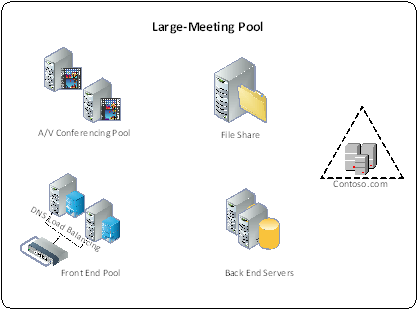
The idea is that you have a dedicated Front End Server, dedicated A/V conferencing server and a dedicated back end server. The reason 2 are shown per workload is simply for redundancy. If you deploy multiple front end servers, then you will have to plan for the required load balancing including Hardware load balancers for http traffic as appropriate. Archiving and Monitoring servers do not have to be dedicated for this pool. Keep in mind this topology will only support 1 large meeting at a time. If you have a need to support more than 1 large meeting at a time, then you will have to duplicate this topology. In my experience however, it has been uncommon to have more than one of these large meetings going on concurrently. Once the servers are set up, it is important to note that some specific conferencing policies must also be set in this pool to support the large meeting. Large meetings are not generally interactive events, so it is important to ensure that policies are in place to limit the load on the servers that are supporting the meeting. Settings like maximum video resolution and disabling application sharing will be very important if the server hardware is to appropriately scale.
Setting the user permissions on the meeting is also very important. The document outlines the settings for the defaults around meeting participants. Typically users within an organization are automatically presenters when they join an online meeting. In the case of a large meeting, generally you want everyone to join as a passive participant. So attendees should join as attendees only with their microphones muted. The organizer (who is the only user set up in the pool) then promotes whomever will be presenting and allows them to have 2-way audio.
The document has a number of suggestions around workflow, setting up a calendar for large meetings, workflow for accepting events and the process for using a moderator. I would say the prescriptively it is very thorough. Customers will not be able to replicate in entirety what is provided by a Worktank (for example), but the document goes a long way to try and show the level of detail that having a moderator requires and to in-house a meeting of that size, you require that kind of logistics.
User Experience
The last item to note is what the user experience is like when they join a meeting of 1000 users. The document publishes observations around the user experience as more users join the meeting and I am including their table here:
Time required for users joining a meeting with 1000 users
|
Media mix |
Time to join A/V |
Time to join data collaboration |
Time to receive roster updates |
Overall join time |
|
1000 users using data collaboration, with 250 users using A/V |
27 seconds |
55 seconds |
25 seconds |
55 seconds |
|
1000 users using data collaboration, with 750 users using A/V |
39 seconds |
62 seconds |
43 seconds |
62 seconds |
|
1000 using data collaboration, with 1000 users using A/V |
48 seconds |
70 seconds |
50 seconds |
70 seconds |
As you can see, if you are going to be using video and audio and your meeting has 1000 users, it can take over a minute to join the meeting and receive the slide content. This is relevant because generally, any hosted web service has a more streamlined join experience for these types of meetings. Its also important to ensure that the users understand that IM in the meeting is limited to Q&A only. The reason is explained in the FAQ that is provided at the end of the document. The key is understanding that for large meeting support, the servers need to be as focused on supporting the meeting as possible. Excessive IM traffic will impact the server load and subsequently could affect the user experience.
Overall Impressions
I am happy to see that the Lync team has been able to complete testing and provide prescriptive guidance on how to support meetings of more than 250 users. Again, in my experience, the number of meetings that are held of that size are normally not more than 10-15 a year. That is based on my experience in booking these types of meetings for a customer that had high Live Meeting usage in the past. I am a little disappointed to discover the overall impact to Lync in having large meetings and that it requires such a dedicated infrastructure. Organizations that decide to take this on should keep in mind the user experience as well and consider limiting the number of 1000 user meetings because of the possible negative experience.
The document is located here.

 The TechCurrents Podcast